


Click here to submit a technical query
| Question - My SkiLog does not appear to record any data.
Answer - The current batch of GTrek/Ski-Log data loggers,
including all units sold at the 2007 London Ski Show with serial
numbers from 10102 to 10352 have been fitted with bigger memory devices
than expected. (We couldn't get 2Mb memory chips and used 4Mb instead
so as not to disappoint our customers).
Question - During downloading I get the following exception: Answer - This error is due to data in the transmission stream being lost. Software from v1.0.1.10 will fix this error. See update notes above Question - Can the GTrek software run on a MAC ? The answer is no and yes. The official answer is
no we do not have a software version that is MAC compatible. However
we do have a number of users that do run this product very successfully
on the MAC platform. Question - The mini-disc supplied with my GTrek is not supported by my PC or my PC does not have a CD drive? There are two solutions here:-
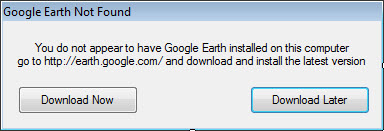
Question - Problem with recorded data in Google Tour? We have noticed that the latest version of Google Earth V7.0.1.8244 (which was the default version at the time of writing) on Google download page is currently a beta version and GTrek recorded data is not displayed correctly. The route data and model icons appears to bounce in and out of the ground instead of a smooth line. This is due to a bug in Google Earth. Version 5.4 software update is now available Click here This version adds may new features and fixes minor software errors Question - When installing GTrek software you encounter a "Turn Windows features on or off" message. Older installation disks (pre-Windows 8) will not install on Windows 8 64 bit systems. You can either order a replacement disk or try the procedure here. Then see the instructions here Due to changes being implemented in our web servers some program features that use the internet will cease to function unless version 5.4 or later is installed. Click here to download the latest update We have been informed that a recent release of Google Earth (anything later than 7.1.2) created an error requesting you to download Google Earth because it can’t be located. If you are getting this message
And you can run Google Earth from the start button then proceed as follows:
This error will be corrected in the next update Can't get a connection to the GTrek in the latest update 5.5.6.
An error has occurred in the script on this page An error can occur when the mouse is moved over a Maps image on the main analyser screen. The actual error refers to a script error in a files called "onion.js". This was noticed about 6 months ago after Google issued an update to the Google Maps program. A software update was issued to the GTrek program to facilitate a fix. It now appears the fault has returned and a GTrek update will be issued soon. In the meantime a fix can be downloaded here. The fix is a change to the registry, click on the link and save the file and then execute it by double clicking it.
From January 11 2017 Google has removed all support for the embedded version of Google Earth and as such the Google Tour option has ceased to function and an error is given. We are currently looking into alternatives and will inform when these are available. If you have any comments please let up know at supprt@gtrek.co.uk When I open the route analyser I get this message
This message will be displayed if Windows thinks you are using an old version of Internet Explorer (IE), you may not be but it thinks you are. There is a simple registry fix, download this file and double click it. To apply all the entries for all users you will need to be an admin user but if not it will fix it just for you so ignore the error. Click here for the fix. Save the file, open your file downloads and run the fix. GPS week number rollover error. A strange fact, GPS satellites send week number data as a 10bit number. This week number counter counts from 0 to 1023 and then rolls over to zero. This happened on the 6th April 2019 and all hell broke loose. Doesn’t anybody remember the millennium bug ? haven’t we learnt anything ? Well maybe not so there a software update version 6.2.0. Goto the download page, ah can’t remember the password then just register your GTrek device again. If you have downloaded data since the 6th April your data will have incorrect dates and we have provided a utility to fix the files available here |
 As of January 11 2017 Google has removed support for the embedded version of Google Earth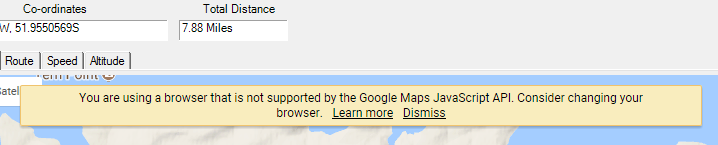

The contents of this website are copyright GTrek Ltd 2017